• Home
  • Knowledgebase
  • English
    • German
    • Turkish
  • Home
  • Knowledgebase
  • English
    • German
    • Turkish
home/Wissensdatenbank/E-Commerce/Webshop/Magento 1
Most searchedAmazon, Shopware, Einrichtung

Connect your Magento 1 Shop with reybex via API key

105 angesehen 0 24. August 2020 jil

Configure the Magento Shop in reybex: Create Magento user, generate API key and test connection

To connect your Magento shop with reybex, you need some data from your Magento shop: 

  • valid endpoint URL
  • user name of the Magento user
  • API key
  • shop ID

The endpoint URL consists of the URL of your Magento shop and the extension: /index.php/api/soap/index/.
Example: www.mein-magento-shop.com/index.php/api/soap/index/
 
Go to your Magento backend to get the username, API key and shop ID. For the user name and API key, you need to create a new user in Magento and assign a new role to it. 

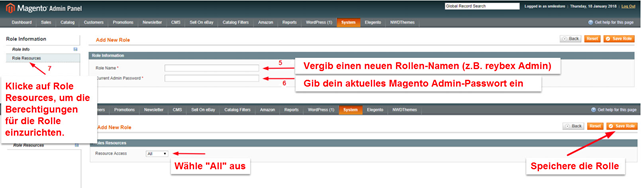
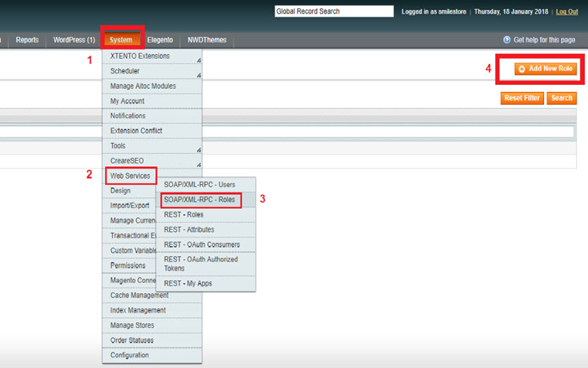
First set up a new role in Magento:
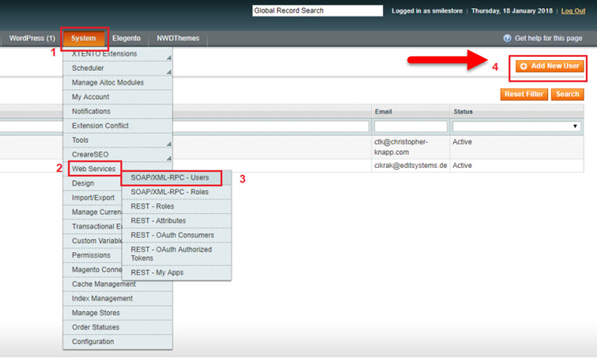
Set up a new user in Magento:
Fill in all required fields. It’s your choice what to enter (including the API key and password).
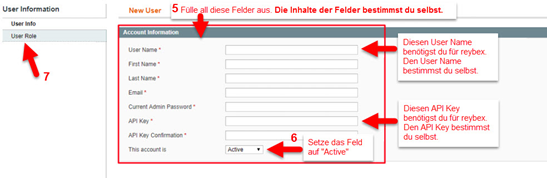
Assign the previously set up role to the user and save your settings. 

TIP: Remember your settings. It is best to take a screenshot of them, because they are no longer displayed.

Transfer the user name and API key from Magento to reybex

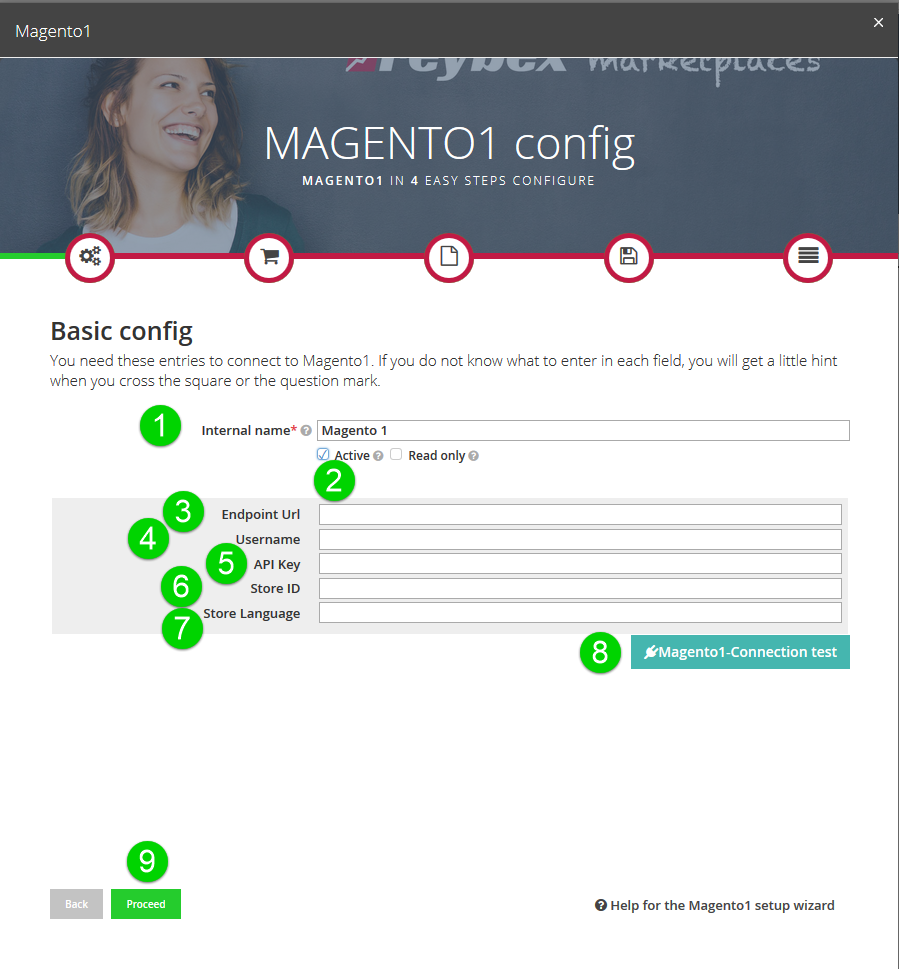
Open the transaction Marketplace Setup Wizard [OMP06].
Click on Available Shops and select Magento 1.  

  1. Enter an internal name for your Magento shop.  
  2. Click the checkbox Active to activate the connection to your Magento shop.
  3. Enter the Endpoint URL of your Magento shop (as described above).
  4. Transfer the just defined Username from Magento to reybex.
  5. Transfer the newly created API key from Magento to reybex.
  6. Enter the Shop ID. You can find the shop ID by going to the tab System in Magento and then to Manage Stores. Move the mouse pointer over the desired Magento shop and the shop ID will be displayed.
  7. Enter the Shop language. 
  8. Click Magento connection test to check if reybex can connect to your Magento shop.
  9. Click Proceed.  

Please note: If you enter your data via Copy&Paste, please make sure that you do not copy any spaces. This will cause errors in the connection to your Magento shop.
Fill in the following forms. Keep on clicking on Proceed. Under Import Categories, click Read categories and import your Magento categories to reybex. Click Save and start article import. 

Further information on importing articles can be found here: 

Article Import via Excel

Article import from marketplaces / shops 

Magento 1
  • Connect your Magento 1 Shop with reybex via API key
The Knowledge Base

In the knowledge database you will find all the important documentation for setting up your reybex system.

Support Links
  • Knowledge Base
  • Video Tutorials
Important Links

Your reybex System
reybex Website
reybex YouTube Channel


Regulations

Privacy Statement
Imprint

Zustimmung verwalten
Um dir ein optimales Erlebnis zu bieten, verwenden wir Technologien wie Cookies, um Geräteinformationen zu speichern und/oder darauf zuzugreifen. Wenn du diesen Technologien zustimmst, können wir Daten wie das Surfverhalten oder eindeutige IDs auf dieser Website verarbeiten. Wenn du deine Zustimmung nicht erteilst oder zurückziehst, können bestimmte Merkmale und Funktionen beeinträchtigt werden.
Funktional Always active
Die technische Speicherung oder der Zugang ist unbedingt erforderlich für den rechtmäßigen Zweck, die Nutzung eines bestimmten Dienstes zu ermöglichen, der vom Teilnehmer oder Nutzer ausdrücklich gewünscht wird, oder für den alleinigen Zweck, die Übertragung einer Nachricht über ein elektronisches Kommunikationsnetz durchzuführen.
Vorlieben
Die technische Speicherung oder der Zugriff ist für den rechtmäßigen Zweck der Speicherung von Präferenzen erforderlich, die nicht vom Abonnenten oder Benutzer angefordert wurden.
Statistiken
Die technische Speicherung oder der Zugriff, der ausschließlich zu statistischen Zwecken erfolgt. Die technische Speicherung oder der Zugriff, der ausschließlich zu anonymen statistischen Zwecken verwendet wird. Ohne eine Vorladung, die freiwillige Zustimmung deines Internetdienstanbieters oder zusätzliche Aufzeichnungen von Dritten können die zu diesem Zweck gespeicherten oder abgerufenen Informationen allein in der Regel nicht dazu verwendet werden, dich zu identifizieren.
Marketing
Die technische Speicherung oder der Zugriff ist erforderlich, um Nutzerprofile zu erstellen, um Werbung zu versenden oder um den Nutzer auf einer Website oder über mehrere Websites hinweg zu ähnlichen Marketingzwecken zu verfolgen.
Manage options Manage services Manage {vendor_count} vendors Read more about these purposes
Einstellungen ansehen
{title} {title} {title}
Most searchedAmazon, Shopware, Einrichtung